
Tenant overlay
The tenant overlay is company-specific intelligence layered on top of the generic base layer (/concepts/architecture/, section on layered intelligence). It is how you share agents, workflows, memory, and skills across every repository your team automates.
Where it is configured
Dashboard (recommended for git remote)
Most teams use a Git repository for tenant intelligence. Set it in the dashboard:
Settings → Advanced → Paths → Intelligence git remote
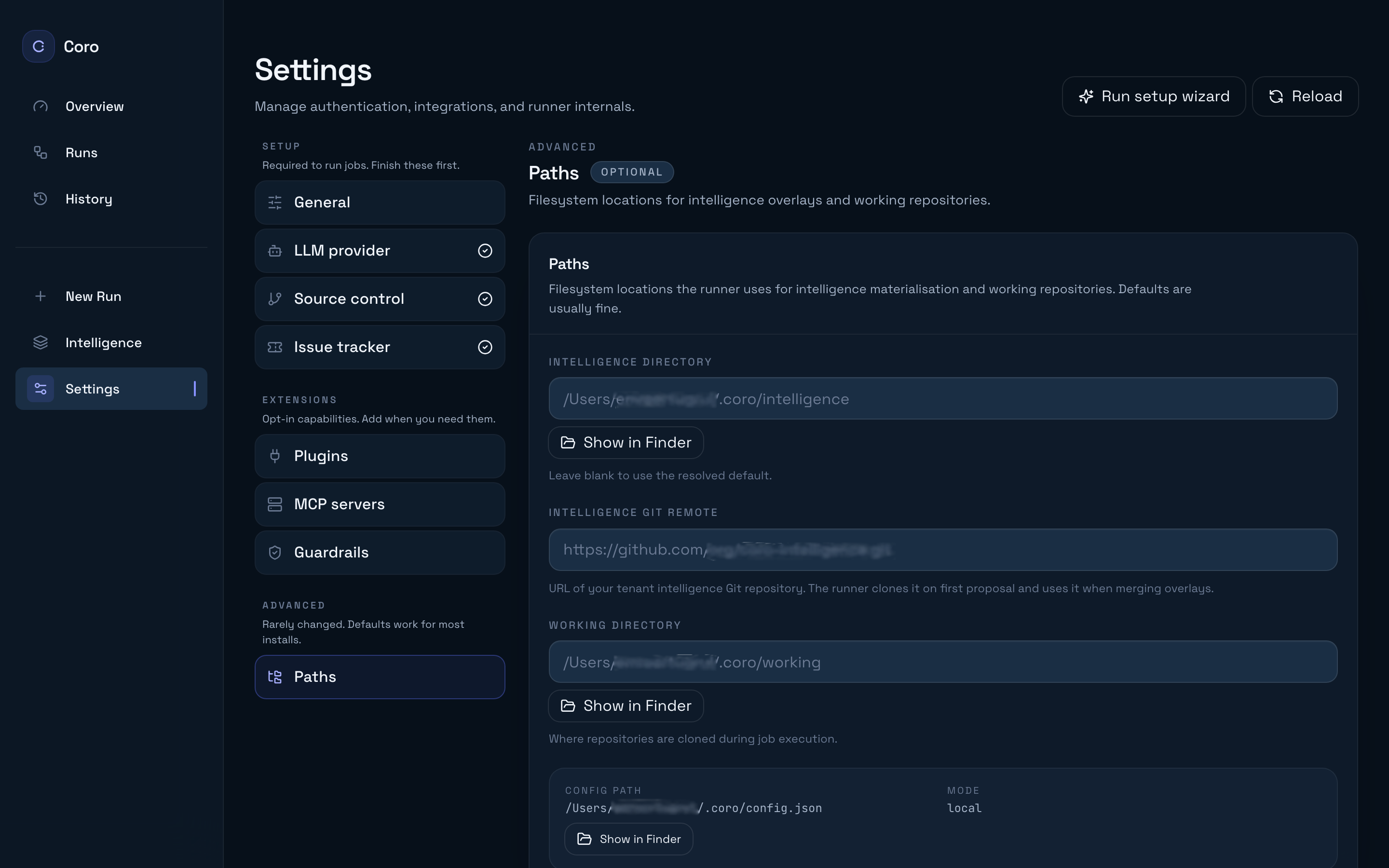
Enter your team intelligence repo URL (for example https://github.com/acme/acme-coro-intelligence.git) and click Save all changes. The runner clones or refreshes the overlay under ~/.coro/cache/tenant-overlays/<tenantId>/ and uses it for both read resolution and propose_change writes.
This field maps to intelligence.gitRemote in config. When tenant.overlay is omitted, the runner synthesises a gitRemote overlay from that value so proposal routing stays aligned.
Config file (full control)
For explicit overlay kinds—or localDir iteration against a working tree—edit tenant.overlay in ~/.coro/config.json. Reveal the file path from Settings → Advanced → Paths → Config path.
Supported shapes:
kind | When to use |
|---|---|
none | Explicitly disable tenant overlay (base only). |
localDir | Fast iteration against a working tree on disk (no dashboard field). |
gitRemote | Production default: team intelligence Git repository (also set via Intelligence git remote). |
cloudBlob | Reserved / stub in current releases — prefer gitRemote. |
Example — gitRemote
{ "tenant": { "displayName": "Acme Backend", "overlay": { "kind": "gitRemote", "url": "https://github.com/acme/acme-coro-intelligence.git", "ref": "main" } }}Example — localDir
{ "tenant": { "overlay": { "kind": "localDir", "path": "/Users/me/src/acme-coro-intelligence" } }}Prefer an explicit tenant.overlay block once you adopt both read and write paths — it avoids ambiguity between “proposal target” and “read overlay” when you also set intelligence.dir in Paths.
What to put in the repository
Minimal layout (living example in examples/tenant-overlay/):
agents/ # Procedure markdown per role — optional overridesworkflows/ # Lane workflows (FAST / STANDARD / DEEP / campaign …)memory/ # Durable tenant knowledge (*.md append streams + index).claude/ CLAUDE.md # Tenant runtime notes (merged with banners) skills/ # On-demand SKILL.md packsYou can also ship .claude/settings.json and other paths the resolver knows about; anything in the overlay participates in last-wins unless the path is an append path (below).
Browse merged layers visually on the Intelligence dashboard page after a job runs.
Append vs replace (merge rules)
When the resolver materialises <workingDir>/<jobId>/_intelligence/:
| Path pattern | Merge mode | Meaning |
|---|---|---|
.claude/CLAUDE.md | Append (with provenance banners) | Tenants extend base guidance; they never erase it wholesale. |
memory/**/*.md | Append (with banners) | Memory is cumulative; additions do not delete prior entries in the merged view. |
agents/, workflows/, .claude/skills/, .claude/settings.json, … | Last-wins replace | The highest layer in the stack that provides the file wins for that path. Order: repo > tenant > base. |
Proposal writes are different: propose_change never writes into _intelligence; it opens a PR against the tenant (or repo) Git clone and, for memory updates, appends into the real file in that clone. See /guides/review-proposals/.
Relationship to the repo overlay
Tenant content is shared across all target repositories. Put only org-wide truth in the tenant layer (service accounts, observability conventions, language defaults). Put repository-specific experiments in .coro/ in the product repo.
Related reading
- /concepts/intelligence-layers/ — short mental model of base, tenant, and repo stacks.
- /guides/customize-agent/ — overriding
agents/*.md. - /guides/add-skill/ — skill packs under
.claude/skills/. - /guides/manage-memory/ — memory files and curation.
- /reference/configuration/ —
tenant.*andintelligence.*keys.