
Team setup
Coro’s “team brain” lives in layered markdown (see /concepts/architecture/): base → tenant → optional repo overlay. This guide focuses on what you standardize once so every engineer gets the same behaviours, tools, and governance.
1. Create the tenant intelligence repository
- Create an empty Git repository (for example
acme-coro-intelligence) in your SCM. - Populate it using the same layout as the shipped base layer: at minimum
agents/,workflows/,memory/, and.claude/skills/folders, even if some start empty. A minimal reference tree lives in thecoro-webexamples. - Decide whether developers will clone this repo locally or only ever consume it through
gitRemote. Most teams usegitRemoteso everyone automatically tracksmainwithout manual sync.
2. Point every runner at the same overlay
On each developer machine, open the dashboard and set:
Settings → Advanced → Paths → Intelligence git remote
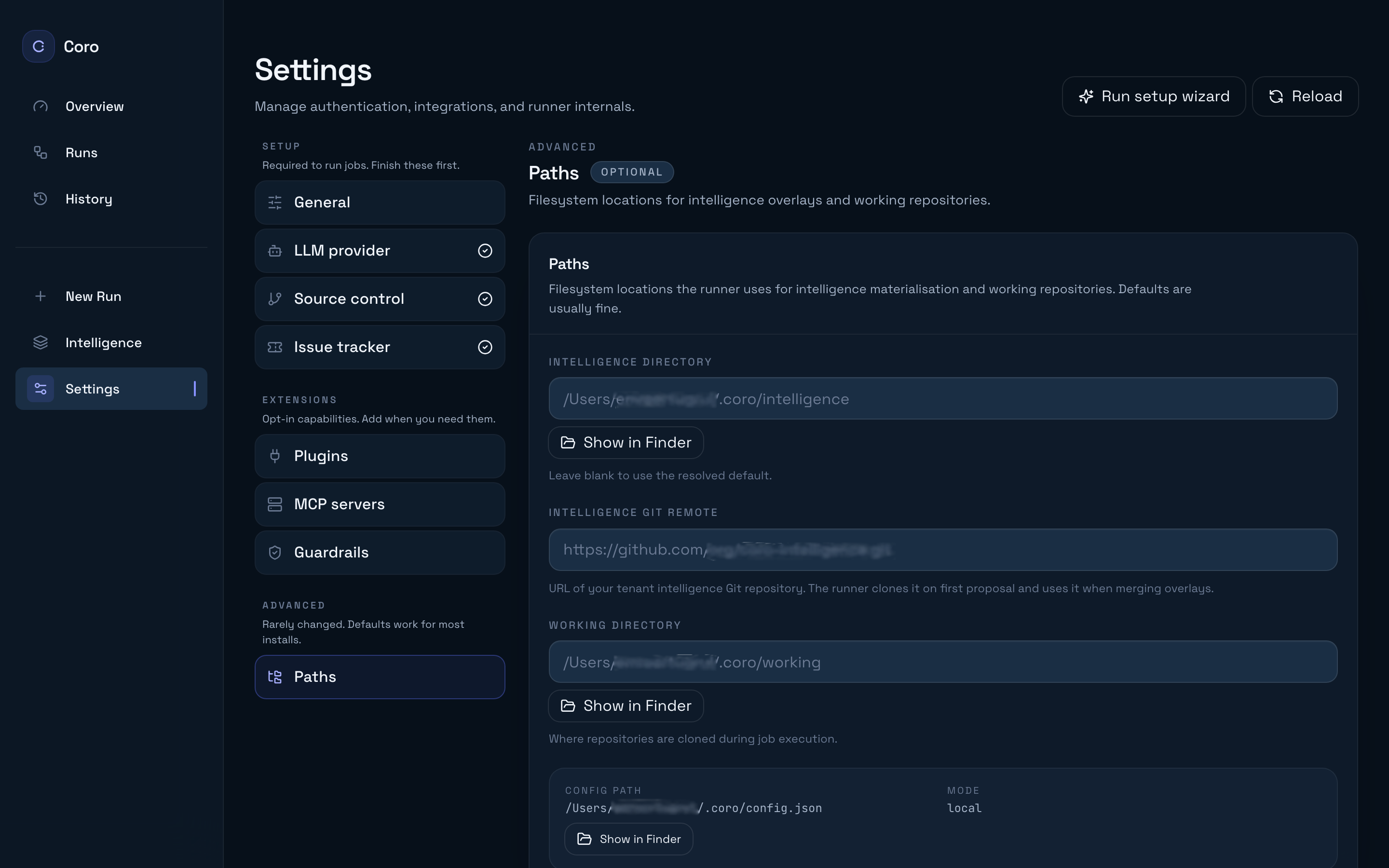
Paste your team intelligence repository URL and Save all changes. This is equivalent to intelligence.gitRemote / a tenant.overlay of kind gitRemote in ~/.coro/config.json. Details: /guides/tenant-overlay/.
For localDir overlays while iterating, edit JSON directly—there is no dashboard field for that kind today.
Every running coro start process resolves the same stack for a given tenant id, so behavioural drift comes only from unmerged PRs or stale local caches (for gitRemote, delete ~/.coro/cache/tenant-overlays/<tenantId>/ to force a fresh clone — see /contributing/local-setup/).
3. Shared plugins, SCM, and trackers
Each developer completes Settings → Setup on their machine (or you distribute a pre-seeded config in your onboarding script):
| Section | Configure |
|---|---|
| LLM provider | Claude login or API key per developer (/guides/claude-code-auth/) |
| Source control | SCM plugin credentials with clone/push/PR rights |
| Issue tracker | Optional Jira / Linear / GitHub Issues |
Store non-secret defaults in tenant overlay memory (for example service account expectations, region names, rollout customs). Store secrets only in ~/.coro/config.json (via Settings) or your secret manager — never in markdown that ships in Git.
Align on:
- Which SCM plugin is installed and which account opens PRs vs approves.
- Tracker provider for campaign planning, if you use it.
- Guardrails defaults under Settings → Extensions → Guardrails (/guides/configure-guardrails/).
4. Dashboard for all members
Everyone runs their own local runner (coro start). The bundled dashboard (served at /dashboard/ on your runner port) is how most people:
- Start runs from New run (home; same as
coro job— see /getting-started/first-job/). - Inspect Runs, proposals, and Intelligence layers.
- Flip interactive checkpoints and tune guardrails in Settings.
Document a single canonical port and bookmark for your team so support questions have one URL. Dashboard tour covers each area.
5. Webhook coordination
Solo mode can fall back to polling for some SCM operations, but teams should register webhooks so parked jobs resume quickly when a PR merges or a review comment arrives. In hybrid mode, the cloud control plane receives HTTPS webhooks, verifies signatures, and forwards events to the correct connected runner over WebSocket — see /guides/webhooks/ and /guides/hybrid-mode/.
Settings → Extensions → Plugins shows the webhook base URL once plugins are configured. Ensure your team’s runbooks document which URL and secret belong in Bitbucket / GitHub / Jira so ops can rotate them without breaking resumes.
6. Cost visibility
Token usage and estimated spend accrue on each Job record in the run detail view. For campaigns, the CLI aggregates child usage — run:
coro campaign show --job <campaign-job-id>Use that output in stand-ups or FinOps reviews. Pair raw numbers with lane choice (/guides/switch-lanes/): FAST jobs should dominate low-risk edits; DEEP should be reserved for cross-cutting or high-risk work where the extra phases are justified.
Related reading
- /guides/tenant-overlay/ — authoritative overlay wiring.
- /guides/review-proposals/ — how intelligence PRs land safely.
- /getting-started/providers/ — Settings screenshots for each provider section.
- /reference/cli/ —
coro job,coro campaign, status, and logs.