
Coro plan mode
Coro plan mode is New run — the dashboard home page. You describe the work; Coro investigates it with you — reading the repo and the ticket, reporting what it finds, asking whatever it needs — and only turns the work into a Run card once it is genuinely clear.
The order matters. A run started from a half-understood request burns a whole agent session and produces a PR nobody can merge, so plan mode is deliberately unhurried: it would rather ask a sixth question than guess. If the investigation concludes there is nothing to build, it says so instead of manufacturing a run.
Plan mode runs as a conversation on the runner (POST /intake/stream). It reads through the SCM and tracker APIs — it does not clone a repo or run workflow tools. With Claude login, the conversation is one Claude Code session until you start a new one, the same resume model a job uses. OpenAI and other HTTP executors replay the native conversation (including tool calls) on each turn.
When to use it
Plan mode is the only New Run surface, and it scales to how much is actually unknown. A one-line change you already understand is a first message plus Generate run. A vague idea, a ticket nobody has scoped, or a bug whose cause is still a theory is where the investigation earns its keep.
Name a tracker ticket in the conversation (for example PROJ-123) and Coro reads it — and its comment thread when the discussion looks load-bearing — then folds the substance into the run description. There is no separate ticket form.
How a session works
- Open New run (home). The page is a transcript with a Recents rail of recent conversations (a Recents dialog on small screens): chat and activity in the main column, composer pinned at the bottom.
- Describe the task in plain language. Use Shift+Enter for a new line; Enter sends. The composer grows up to about ten lines.
- While Coro looks things up, you see the same live feed a running job shows: its reasoning, what it is saying, and activity chips for similar reads (for example Read 17 files). Expand a chip to see each call.
- Coro investigates: it reads what it needs, reports findings in plain terms, and asks about the things code cannot tell it — intent, priorities, constraints that live in your head. It will disagree with you if the repo contradicts the request. There is no cap on how many turns this takes.
- A readiness line above the composer shows where the investigation stands and what is still open. See Readiness below.
- When the investigation has a write-up — what the code does, what should change, what is still open — Coro emits a
<findings>block. The dashboard hides the tag and inserts a Findings card in the transcript, rendered as markdown. A later write-up replaces the previous card (marked superseded), the same way a revised run does. When Coro reports Ready to start, the same Generate run control that lives in the composer also appears under that write-up. - When you click Generate run (or agree once Coro reports itself ready), it emits a
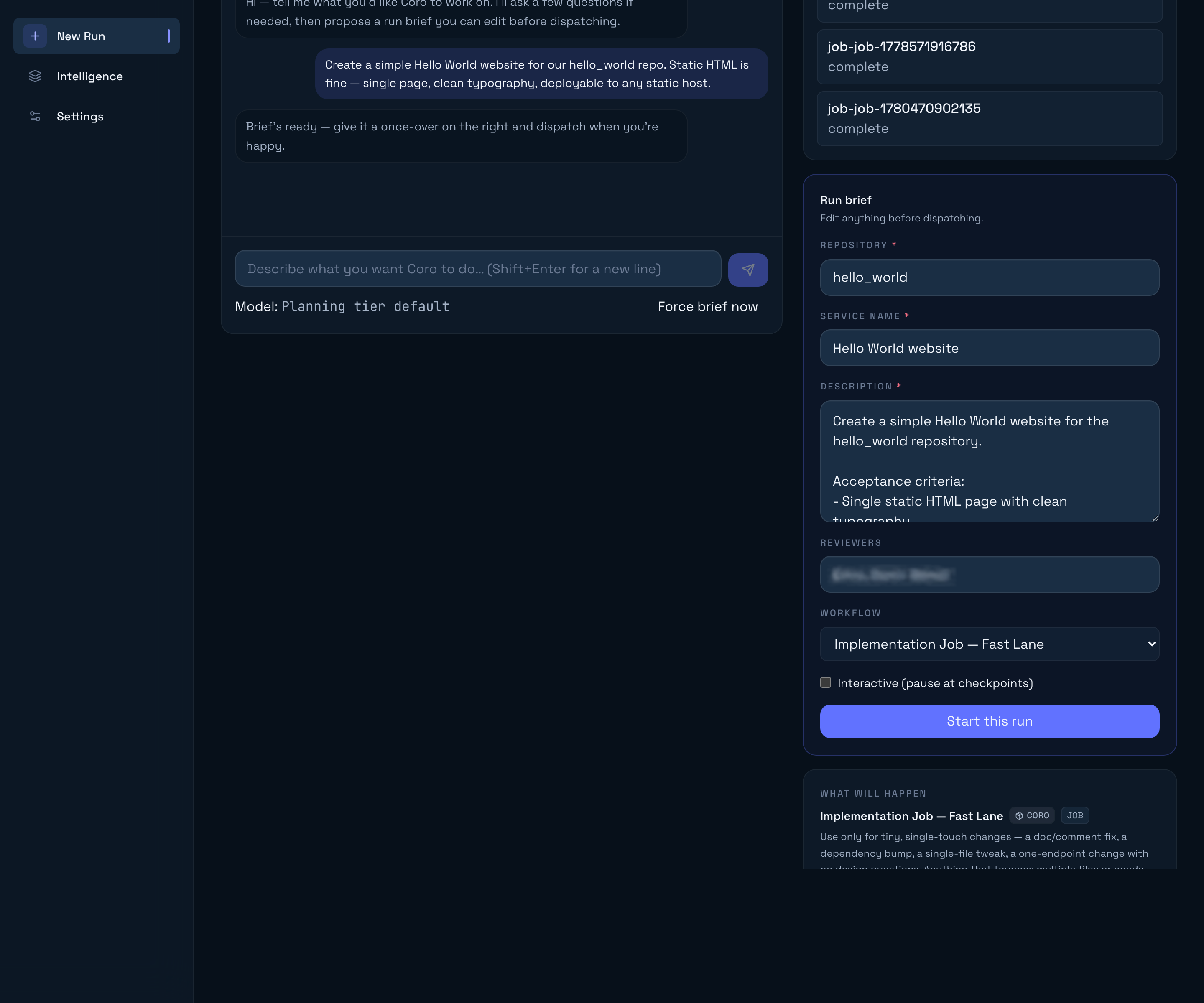
<run>…</run>block. The dashboard hides the raw JSON and inserts a Run card in the transcript — collapsed by default, with a large Start run button. Expand it to edit repository, service name, description, reviewers, workflow, interactive checkpoints, and to see What will happen (phase timeline, duration band, similar runs). - Follow-up chat continues below the cards. A revised run is a new card; the previous one is marked superseded.
Leaving New run mid-stream (another open-run tab, then back) keeps the conversation. Conversations are stored on the runner — SQLite locally, Postgres in hybrid — not in the browser. A Findings card or a generated run does not close the session; keep typing. A rate-limit parks the turn, not the conversation — wait and send again. New conversation and starting a run keep the current conversation in Recents and start a fresh one. The in-memory LLM cache is swept after 12 hours idle or a runner restart; loading the conversation from Recents restores the transcript and enough runner context to keep chatting.
Readiness
Every Coro turn carries a readiness verdict, rendered as a single line above the composer:
| State | Means | What the button does |
|---|---|---|
| Investigating | Something that would change the implementation is still unresolved. The line lists what. | Generate run stays available but understated — use it and Coro will name what it had to assume. |
| Ready to start | Coro could write a description an autonomous agent would execute correctly with no further input. | Generate run is highlighted and pulses. The same control also appears under the current Findings write-up. |
| No run needed | The investigation concluded there is nothing to build. | Still available, in case you disagree. |
Readiness is the agent’s own judgement, exposed rather than hidden, so “is this clear yet?” is not something you have to guess. Coro is told to treat the checklist behind it as binding: which repo and files change, the observable behaviour afterwards, the acceptance criteria, the edge cases, and what must not change.
If Coro produces a run while still investigating and you did not ask for one, the dashboard holds it back and says which question is still open. Clicking Generate run overrides that.
Findings
The investigation write-up is a Findings card, not a chat bubble. Narrating sentences stay in the transcript (“Let me look at the decode path.”); the headed report of what Coro concluded is markdown inside <findings> tags, hidden from the bubble and rendered in the card — headings, lists, and code, the same way a job artefact is read.
A later write-up supersedes the previous card. Findings can land without a run: No run needed is supposed to leave you with a readable conclusion, not an empty composer. When readiness is Ready to start and no draft Run card exists yet, Generate run sits under the markdown so you can turn the conclusion into a brief without scrolling to the composer.
What the run inherits
When you start the run, the current Findings write-up is copied into the job as plan/findings.md (and registered as a plan-findings-md artefact). The spec-writer and planner read it before deriving scope, so the investigation’s conclusions — what the code does today, what you decided, what was still open — travel with the job instead of living only in params.description. File quotes in that write-up are a snapshot; the job re-reads any file it intends to change. CLI jobs that never went through plan mode have no plan/ directory.
When no run is needed
“Nothing to build” is a successful outcome, not a failed session. Coro reports it when the behaviour already works, the concern is handled elsewhere, the premise turns out to be wrong, or the fix belongs outside Coro’s reach — and it explains which, citing what it read, as a Findings card.
Nothing is dispatched in that case. The conclusion stays in the conversation until you start a new one. If you want it recorded, copy it into the ticket yourself.
Model choice
Click the Model: label below the composer to open a model picker. Your choice is stored on this investigation on the runner; it is not written to ~/.coro/config.json.
When no override is set, plan mode resolves the planning tier from your LLM aliases (typically a high-capability model such as Claude Opus or your tenant’s tier:planning binding). Because the investigation is the part that determines whether the run succeeds, this is the wrong place to economise on model quality.
Generate run
Asks Coro to turn the conversation into a Run card now. Anything typed in the composer is sent along with the request, so you can add a last constraint and generate in one action.
When Coro reports itself ready, the control pulses so the next step is obvious. The same button also appears under the Findings write-up until a draft run exists. After a Run card is in the transcript, the composer shows a static Run generated chip instead of pulsing Generate run.
It is always available in the composer — investigating is a posture, not a lock. Ask early and Coro produces the run but tells you in one line what was still unresolved and what it assumed, so a rushed run is visibly a rushed run.
Read-only lookups (trackers and repos)
When Allow read-only lookups is enabled under Settings → General → Plan mode (default on), plan mode can call a small curated tool set — reads only, never writes:
| Tool | Use when |
|---|---|
tracker_get_issue | You name a ticket key (PROJ-123, ENG-42, …) |
tracker_get_comments | The ticket’s discussion carries decisions its description omits |
tracker_search_issues | Coro should find an existing ticket, or check whether this was attempted before |
scm_list_files | Coro does not know the repo layout yet |
scm_read_file | Coro needs a file’s contents to understand the work |
scm_search_code | You mention a symbol or ask where something lives |
Lookups appear as stacked activity chips, not a chat bubble per tool. Each call is capped at 15 seconds and a single turn is capped at 25 tool rounds — the one ceiling that remains, because it is the only place plan mode spends without you between the steps.
Coro reads as much as the investigation needs rather than rationing calls, and its own prior results are replayed to it on later turns, so it does not re-read a file it has already seen.
Plan mode never comments on tickets, transitions issues, commits code, or opens PRs — those actions belong to the workflow agents after dispatch.
Disable lookups anytime via Settings → General → Plan mode → Allow read-only lookups. With them off, Coro can still shape a run from what you tell it, but it cannot verify any of it.
What the run contains
The model emits JSON inside <run> tags with this shape:
{ "repo": "org/repo-name", "serviceName": "short human label", "description": "what to change and where, acceptance criteria, constraints, edge cases, and the decisions reached in the conversation", "reviewers": ["alice"], "workflowPath": "workflows/job/workflow.md", "interactive": true}The description is the whole point of the investigation. It is the only thing the autonomous agent will ever see — not the conversation, not the ticket, not the files Coro read. So it has to carry the conclusions: what changes and where, how anyone will know it worked, what must not break, and any decision you made along the way. If you named a ticket, the description restates its content.
This is also why editing the card is worth a minute of your time: everything downstream reads that field.
Workflow selection inside plan mode follows a lightest-lane-first policy:
workflows/job/workflow.md(STANDARD) — default for almost all scoped work.workflows/job-fast/workflow.md(FAST) — tiny, single-touch changes only.workflows/job-deep/workflow.md(DEEP) — genuinely high-stakes work that needs an architecture step (new public API, auth/security, irreversible migration, cross-service contracts).
When uncertain, plan mode prefers STANDARD; the Planner can still call switch_workflow later if the repo contradicts the initial guess. Change the workflow on the expanded Run card before dispatch — the What will happen timeline updates immediately.
After dispatch — spec writing
Jobs created in plan mode still enter the workflow’s spec-writing phase first (for STANDARD and DEEP lanes). The Spec Writer agent turns your description (or tracker ticket) into feature-spec.md and registers it as a spec-md artefact on the dashboard.
That phase uses the workflow’s coding tier (typically Claude Sonnet) — not the mini tier used for lightweight subagents like inline code review.
Tracker-triggered jobs additionally read the ticket via tracker_get_issue; CLI and plan-mode jobs work directly from params.description.
Coach mode interaction
When coach mode is enabled (default for new installs):
- Interactive defaults to on for your first few runs.
- Extra guidance appears on the New Run page until you graduate (default: after five completed dispatches).
Graduation is automatic — the runner increments coachMode.totalRuns on each dispatch. You can disable coach mode anytime under Settings → General.
Session length and cost
There are no turn or token limits on a plan-mode session. Earlier builds capped a session at 8 turns and 60,000 tokens, which is fatal to an investigation: you would hit the ceiling mid-dig, with the composer disabled and no run to show for it. Every turn here is one you initiated, so there is no runaway loop for a cap to protect against — the only unattended spend is the 25-round tool loop inside a single turn, which is still bounded.
Cost is surfaced instead of enforced. Below the composer you get:
- Turns and tokens — cumulative for the session.
- A context meter — how much of the selected model’s context window the conversation currently occupies.
The context window is the real ceiling on a very long investigation. The meter turns amber above 85% so a session about to outgrow its model is visible before it fails. Automatic compaction is not implemented yet; until it is, a session that fills the window needs a fresh conversation (generate the run first if you have one worth keeping).
Plan mode’s cost is small next to what it protects. A run that has to be abandoned and restarted costs an entire agent session; an extra half-dozen intake turns costs a fraction of that.
Troubleshooting
| Symptom | Likely cause |
|---|---|
| Blocking panel: configure an LLM provider | No executor loaded; finish Settings → LLM provider and relaunch the desktop app or restart coro start. |
| Warning above the composer; Start run disabled | No source-control plugin; finish Settings → Source control. |
| Empty or instant failure after “thinking” | Executor healthcheck failed; verify API key or Claude login. |
| ”Request was aborted” (older builds) | Known Express 4 + Node 20 interaction with premature request close events — upgrade to a build that decouples plan-mode streams from HTTP lifecycle. |
| Run missing repo or reviewers | Model could not infer from context; expand the Run card and edit before dispatch, or mention repo/reviewers explicitly in chat. |
| ”Held back a run — still unresolved: …” | Coro emitted a run while its own readiness said otherwise. Answer the open question, or click Generate run to take it anyway. |
| Coro keeps asking instead of producing a run | Working as designed while something material is unresolved — the readiness line names it. Click Generate run to move on regardless. |
| Coro re-reads files it already read | Its per-turn evidence is not reaching it; upgrade to a build with runner-side plan-mode session state. |
| Conversation vanished after leaving New run | Upgrade to a build that persists conversations on the runner. Open it from Recents. |
| No spec artefact after spec-writing | Spec Writer must call post_artifact({ kind: "spec-md", data: { path: "feature-spec.md" } }) — ensure your tenant has not replaced agents/spec-writer.md with a version that omits this step. |
Related reading
- Your first job — end-to-end from install to merged PR.
- Dashboard tour — Settings → General, run detail artefacts.
- Configuration —
coachModeandintake.toolsEnabled. - HTTP API —
POST /intake/streamSSE contract. - Switch lanes — FAST / STANDARD / DEEP after planning begins.